


If you’re here, chances are your PS5 keeps turning off randomly and it’s driving you crazy. One minute you’re deep into a boss fight or online match, the next moment the screen goes black, the sound cuts out, and the console is completely off.
No warning. No error message. Just pain.
You’re not alone. This is one of the most searched PS5 issues right now, and the good news is: in most cases, it can be fixed without sending your console for repair.
This guide breaks down why your PS5 keeps turning off randomly and walks you through step by step fixes, starting with the most common and effective solutions. The focus is on clear explanations, realistic troubleshooting, and fixes that are commonly effective.
Why Does the PS5 Keep Turning Off Randomly?
Before jumping into fixes, it helps to understand what’s going on. A PS5 shutting down unexpectedly usually falls into one of these categories:
- Overheating due to dust or poor airflow
- Power supply issues
- Software or firmware glitches
- Rest Mode or HDMI settings conflicts
- Hardware defects (less common, but possible)
In most real‑world cases, overheating and power‑related issues are the main culprits.
Fix 1: Check for Overheating (Most Common Fix)
If your PS5 turns off after 30 minutes to a few hours of gaming, overheating is very likely the problem.
Signs of overheating:
- Console feels very hot to the touch
- Fan gets loud before shutdown
- Shutdown happens during demanding games
What to do:
- Turn off and unplug your PS5
- Move it to a well‑ventilated area
- Avoid tight cabinets or enclosed TV stands
- Leave at least 4-6 inches of space around it
- Clean dust from vents
- Use compressed air
- Focus on rear and side vents
Dust buildup inside the console can trap heat and force the system to shut down as a safety measure.
💡 Pro tip: If you have pets or live in a dusty environment, cleaning every 3-4 months makes a huge difference.
Fix 2: Clean the PS5 Fan (Highly Effective)
If external cleaning does not help, internal dust buildup around the fan may be the issue.
You don’t need to fully disassemble the console.
How to safely clean the fan:
- Remove the PS5 side panels (they slide off)
- Use compressed air to blow dust out of the fan
- Do not use a vacuum directly on components
- Reattach panels and test
Many users report that random shutdowns stop after a proper fan cleaning.
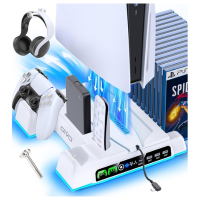
PS5/Slim/Pro Stand + Cooling Station (3-Level Fan) with Controller Charging Dock
If random shutdowns are heat-related, improving airflow and keeping your setup organized can help long-term.
- 3-level cooling fan designed to pull heat away from the console
- Dual controller charging dock with LED indicators
- All-in-one stand to keep accessories tidy
Disclosure: This is an affiliate link. If you buy through it, WithinPlay may earn a small commission at no extra cost to you.
Fix 3: Check the Power Cable and Power Source
A loose or faulty power connection can cause sudden shutdowns.
Try this:
- Unplug the power cable from both the PS5 and the wall
- Plug it back in firmly
- Try a different wall outlet
- Avoid power strips or surge protectors temporarily
If possible, test with another compatible power cable.
Sometimes the fix is surprisingly simple.
Fix 4: Disable Rest Mode (Underrated Fix)
Rest Mode issues occur more often than expected.
Turn off Rest Mode completely:
- Go to Settings
- Select System
- Open Power Saving
- Set Time Until PS5 Enters Rest Mode to Don’t Put in Rest Mode
Also disable HDMI device link if enabled:
- Settings → System → HDMI → Turn off HDMI Device Link
This prevents unexpected power state conflicts.
Fix 5: Update System Software
Outdated or bugged firmware can cause stability issues.
Update your PS5:
- Go to Settings
- Select System
- Open System Software
- Choose System Software Update and Settings
Install any available updates and restart the console.
Fix 6: Rebuild Database (Safe and Helpful)
Rebuilding the database can fix corrupted system data without deleting games.
Steps:
- Turn off the PS5 completely
- Hold the power button until you hear two beeps
- Connect controller via USB
- Select Rebuild Database
This process can take a few minutes but often improves system stability.
Fix 7: Check for Hardware Failure (Last Resort)
If your PS5 keeps turning off randomly even after trying everything above, you may be dealing with:
- Power supply unit (PSU) failure
- Internal thermal sensor issues
- Manufacturing defect
At this point, professional repair or warranty service is recommended.
When Should You Worry?
You should take action immediately if:
- The PS5 shuts off within minutes of turning on
- It turns off even while idle
- You smell burning or hear clicking sounds
These are not normal and shouldn’t be ignored.
Final Thoughts: Most Random Shutdowns Are Fixable
If your PS5 keeps turning off randomly, don’t panic. In most cases, the issue comes down to overheating, dust buildup, or simple power settings.
Start with cleaning and ventilation. Then move on to software fixes. Only consider repair after you’ve ruled out the basics.
In many cases, restoring stability only requires addressing one underlying issue.
If this guide helped you, bookmark it, since random shutdowns can return when regular maintenance is ignored.
