

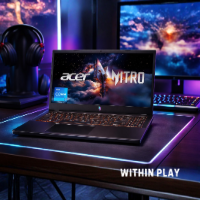
If you have been searching for a gaming laptop that balances performance, price, and practicality, the Acer Nitro V 15 might already be on your radar. This model, powered by the Intel Core i5-13420H and NVIDIA GeForce RTX 4050, is designed for gamers who want solid performance without stepping into premium price territory.
What makes this laptop interesting is not just the specs on paper, but how those specs translate into real-world gaming, multitasking, and everyday use. From fast-paced shooters to content creation tasks, the Nitro V 15 aims to deliver a dependable experience for users who want versatility in one machine.
Let’s break it down and see if it truly lives up to expectations.
First Impressions: Clean, Subtle, and Functional
The Acer Nitro V 15 sticks to a familiar gaming laptop design, but in a more refined way. Instead of going overboard with aggressive angles and flashy RGB everywhere, it keeps things relatively clean.
The matte black finish gives it a professional look, which means you can easily use it in a work or study setting without it screaming “gaming laptop.” The backlit keyboard adds just enough flair for nighttime gaming sessions while staying practical.
At around 15.6 inches, the size feels just right. It is large enough for immersive gameplay but still portable enough to carry around without feeling like a burden.
Performance: Strong Enough for Modern Gaming
The heart of this machine is the Intel Core i5-13420H processor. While it is not the highest-end chip in the lineup, it is more than capable for gaming and multitasking.
In real-world usage, this CPU handles:
- Modern AAA games at medium to high settings
- Competitive titles like shooters and MOBAs at high frame rates
- Multitasking such as gaming while running Discord, streaming apps, or browsers
- Light content creation including video editing and photo work
The system feels responsive even when switching between tasks. Opening multiple tabs, running background apps, and jumping into a game does not slow things down significantly.
This is where the Nitro V 15 quietly shines. It is not trying to be the most powerful laptop out there. It simply delivers consistent performance where it matters.
RTX 4050: Entry-Level Ray Tracing Done Right
The NVIDIA GeForce RTX 4050 Laptop GPU is a major highlight here. This GPU brings modern features like ray tracing and DLSS 3.5 into a more affordable segment.
In actual gameplay, you can expect:
- Smooth 1080p gaming in most modern titles
- High settings for esports titles with excellent frame rates
- Ray tracing support in select games with DLSS helping maintain performance
DLSS 3.5 plays a big role in making games look better without sacrificing frame rates. It uses AI to upscale visuals and improve performance, which is especially useful on a laptop GPU like this.
While it is not designed for ultra settings in every game, it strikes a strong balance between visual quality and performance. For most gamers, that is exactly what matters.
Display: 165Hz Makes a Real Difference
One of the standout features is the 15.6-inch Full HD IPS display with a 165Hz refresh rate.
This is where the gaming experience really comes alive.
The higher refresh rate makes movement feel smoother and more responsive. If you play fast-paced games, you will notice the difference immediately. Tracking targets feels easier, and overall gameplay feels more fluid.
The IPS panel also ensures decent color accuracy and viewing angles. It is not a professional-grade display for color-critical work, but it is more than good enough for gaming, streaming, and everyday use.
The screen-to-body ratio of over 80 percent gives it a more immersive feel compared to older designs with thicker bezels.
Memory and Storage: Good Start, Room to Grow
Out of the box, the Nitro V 15 comes with:
- 8GB DDR5 RAM
- 512GB PCIe Gen 4 SSD
For casual users, this setup is fine. The system boots quickly, apps load fast, and basic multitasking is smooth.
However, for gaming and heavier workloads, 8GB RAM can feel limiting. Many modern games benefit from 16GB or more.
The good news is that this laptop supports upgrades. With two RAM slots and support up to 32GB, you can easily add more memory later.
The SSD performance is solid. Fast load times and quick file transfers make everyday use feel snappy. If needed, you can also expand storage depending on your usage.
Cooling and Thermal Performance
Gaming laptops often struggle with heat, but the Nitro V 15 handles it reasonably well.
During extended gaming sessions, the system does get warm, but not to an uncomfortable level. The fans become noticeable under load, which is expected, but they do their job in keeping temperatures under control.
Performance remains stable even during longer sessions, which is what you want in a gaming machine.
If you plan to push the laptop hard regularly, using a cooling pad can help improve airflow and maintain optimal performance.
Connectivity: Built for Modern Use
The Nitro V 15 comes equipped with features that make it versatile in different environments.
Wi-Fi 6 ensures fast and stable wireless connectivity, which is especially useful for online gaming and streaming. You get lower latency and more consistent performance compared to older standards.
For wired connections, the Killer Ethernet E2600 provides reliable and fast networking. This is ideal for competitive gaming where every millisecond counts.
The inclusion of Thunderbolt 4 is a big plus. It allows:
- Fast data transfers
- External display connections
- Charging support
- Expanded functionality through docking stations
This makes the laptop future-ready and adaptable for different setups.
Keyboard and User Experience
The backlit keyboard is comfortable to use, whether you are gaming or typing for long periods.
Key travel feels responsive, and the layout is familiar, making it easy to adjust quickly. The lighting is subtle enough to be useful without being distracting.
The trackpad is functional and responsive, although most gamers will likely use an external mouse for better control.
Overall, the user experience feels polished and practical.
Battery Life: Manage Expectations
Like most gaming laptops, battery life is not its strongest feature.
For regular tasks like browsing, writing, or watching videos, you can get a few hours of use. However, gaming on battery will drain it quickly.
This is not a dealbreaker since gaming laptops are typically used plugged in for maximum performance.
Think of the battery as a convenience for short sessions rather than long unplugged gaming.
Who Is This Laptop For?
The Acer Nitro V 15 is ideal for:
- Gamers looking for an affordable entry into RTX graphics
- Students who want a balance between gaming and productivity
- Content creators working on light to moderate projects
- Users who want upgrade flexibility without paying premium prices
It may not satisfy hardcore enthusiasts who demand ultra settings in every game, but for most users, it delivers more than enough performance.
Real-World Use: Where It Shines
What stands out most about the Nitro V 15 is how well it handles everyday scenarios.
You can start your day with work or study tasks, switch to editing photos or videos, and then jump into a gaming session without needing a second device.
This kind of flexibility makes it a strong value option.
It is not just a gaming laptop. It is a reliable all-around machine that adapts to different needs.
Final Verdict: A Smart Choice for Practical Gamers
The Acer Nitro V 15 does not try to be the most powerful or the flashiest laptop on the market. Instead, it focuses on delivering solid performance, useful features, and upgrade potential at a reasonable price point.
The combination of the Intel Core i5-13420H and RTX 4050 provides a capable foundation for modern gaming and multitasking. The 165Hz display enhances the experience, while the upgrade options ensure the laptop can grow with your needs.
There are compromises, such as the base 8GB RAM and average battery life, but these are expected at this level and can be addressed with simple upgrades or usage habits.
If you are looking for a dependable gaming laptop that offers real value and flexibility, the Acer Nitro V 15 is definitely worth considering.
It is a machine that understands what most users actually need and delivers exactly that.
Acer Nitro V 15 With RTX 4050
A solid choice for gamers who want fast 1080p performance, a smooth 165Hz display, and the added boost of RTX 4050 graphics without jumping to a much higher price range.
Why it stands out:
- Intel Core i5-13420H for gaming and everyday multitasking
- NVIDIA GeForce RTX 4050 Laptop GPU with DLSS support
- 15.6-inch Full HD IPS display with 165Hz refresh rate
- 512GB Gen 4 SSD for fast boot and load times
- Wi-Fi 6 and Thunderbolt 4 for modern connectivity
As an Amazon Associate, we may earn from qualifying purchases.
